 Perl en PFE
What is PFE: the Programmers File Editor, written by Alan Phillips. Very good ASCII text editor for programmers, for example for creating Perl scripts. Fast, no luxaries lixe syntax highlighting, but can handle very large (megabyte) files. Many useful commands for programming, I use it quite often. By the way, this editor is no longer actively supported; use at your own risk.
However, no program is perfect, and you always come across some possibilities which are lacking. But this is actually a strength of PFE: you can extend it, for example by making Perl scripts and hokking these into the execute menu of PFE. PFE can then call these scripts, which communicate abck to PFE using the 'DDE' mechanism (Dynamic Data Exchange). On my general Dutch Perl pagina I have a simple example on how to select and evaluate expressions, replacing the expression with the result. On this page some more scripts: three scripts to let you cut, copy and paste arbitrary rectangular areas, as for example columns in ASCII tables.
Cut, Copy and Past of Rectangles
 First the use of
them:
First the use of
them:
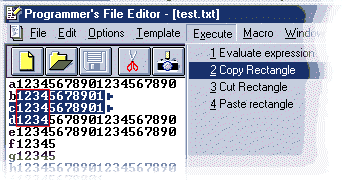
Copying/pasting can be sone by moving the cursor to the top left corner of the rectangle to be selected, and then using the shift or left mouse button selecting the rectangle of interest by moving to the lower right corner. By next selecting the Execute menu you can choose the requested operation. You can see it in some detail in the picture on the left; I indicated in red the selected rectangle based on the selection area (in blue). Also you can see the extensions of the Execute menu, including my expression evaluation extension (note: actually the execute menu has one more column, but due to lack of area in the picture I erased this one).
Pasting is even more easy (assuming you already copied or cut a rectangle): just go with the cursor to the location the top left corner of the rectangle should be located, and select in the Execute menu the 'Paste Rectangle (or however you called it during installation), have some patience to let perl do the job, and voila: the rectangle is inserted.
Problem: the scripts do not yet handle tabs correctly, maybe in a next release. However, as I always have PFE configures to convert tabs into spaces, this does not bother me..
Installation
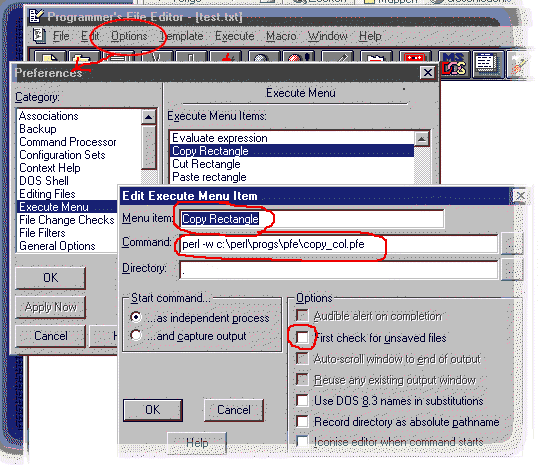
To start, you need the three Perl scripts, see at the bottom of this page. Next to this, you need ActiveState Perl, the Win32::DDE extension module (can be downloaded using the Perl Module Manager of ActiveSate), and the Win32::Editor::PFE module of Jenda Krynicky (both modules need to be installed). Next, put the location and titles of the scripts in the Execute menu of PFE: go via Options/Preferences to the Edit Execute menu item. In this form, fill in the location of the script, and your name for the command, into the fields, see the fields outlined in red in the below figure (adapt the path to the location you used to save the scripts):
Simple, not? The scripts can be downloaded using the following links( best using the right mouse key and select 'Save Target As .....'):
- Cut Rectangle: del_col.pfe
- Copy rectangle: copy_col.pfe
- Paste Rectangle: past_col.pfe
- Script to convert 'tabs' to (maximal) 4 spaces: untab4.pfe
Have fun.


op mijn site


